
Google Adds New Disco Ball App Icons to Pixel Phones

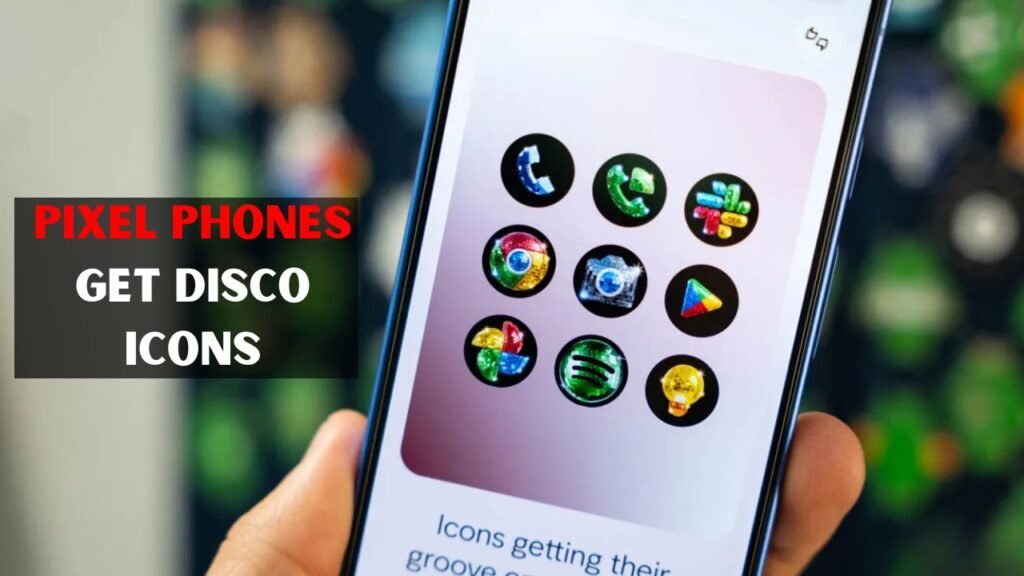
Google has released a new set of Disco icons for Pixel phones that provides users with a fun and fresh way to customise their home screen. This new look takes the normal app icons and makes them shiny disco ball inspired icons with a dark background and bright reflective details. The update is part of Pixel’s custom icon feature that allows users to select different icon designs instead of the default Android look. The Disco theme is for those who like their phone designs bold, fun and fashionable. It’s not changing how apps work but it is changing how they look on the home screen. Pixel device owners can apply it through Wallpaper & Style settings. This little update is making Pixel phones more personal, creative and visually distinct from other Android devices.

Google Adds a Fun Disco Look to Pixel Phones
Google’s new Disco icon style makes home screens on Pixel phones more colourful and party-like. Each app icon receives a shiny design that resembles a disco ball. The icons look with shiny reflections and dark backgrounds, sparkling details. It makes the phone feel more unique, without really changing the apps. This feature is useful for users who like to customise and want their device to look different. Pixel users can use Google’s own built-in icon creator instead of downloading a third-party icon pack. This update isn’t a huge software update, but adds a fun visual option that many users might enjoy.
 Sony RX10 V Review Explains Why This Premium Camera May Not Be the Best Upgrade for Every Buyer
- It gives a disco ball style to the app icons.
- The theme is compatible with the Pixel Launcher.
- It changes the look of the icon, not the app functions.
- It makes the home screen cooler.
- Designed for Pixel phone users.
How to Enable the Disco Icon Style
Pixel users can activate the Disco icon style from the home screen settings on their phone. The process is simple and doesn’t require any additional app. All users have to do is open the customisation menu, select the icon option and then choose the Disco style. Once you download and apply it, the home screen icons will be replaced with the new shiny design. This makes the feature easy for normal users, even if they don’t know much about Android customisation. It’s baked into Pixel’s system, so it feels cleaner and safer than pulling random third-party icon packs from unknown sources.
 Redmi Note 17 Pro Specifications Confirm Bigger Battery Stronger Build and Faster Performance
- Press and hold on the Pixel Home Screen.
- Tap on “Wallpaper & Style”
- Select “Icons” option.
- Tap “Create”, then select “Disco”.
- Apply the new icon style and download.
Why This Update Matters for Pixel Users
This update is important as the customisation of the phone is getting more important for users. Nobody wants their phone to look like everyone else’s. They want colours, themes, wallpapers and icons that are personality. Pixel users now have another creative option: disco icon style. It also suggests Google is trying to make Pixel phones more fun and personal. The change is small but it can put a whole new face on the home screen. For bold design fans, this icon style allows you to change the look of the phone without having to buy a new device.
 Samsung Galaxy Z Fold 8 Leak Reveals Display Camera and Battery Upgrades Ahead of Official Launch
- Further personalisation is possible.
- Restores the look of new to your Pixel.
- That’s a clever design solution.
- It’s a way for people to show off their style.
- It just makes your home screen look nicer.
Disco Icons and the Future of Android Customization
The Disco icon style is also a good indicator of where Android customisation might go in the future. Google could add more creative icon styles to Pixel phones. These styles allow users to quickly change the look of their phone without third-party launchers. Google may add more AI-generated icon themes, seasonal themes and personal design options in the future. It’d be more fun and flexible for the Pixel phones. Disco theme a little feature but shows a bigger direction. Google wants Pixel users to be able to customise their phone’s look and feel on a regular basis.
- More icon styles can be added.
- AI-based themes might become a trend.
- You could see more pixel customisation.
| Topic | Details | User Benefit |
|---|---|---|
| New Feature | Google added a Disco icon style for Pixel phones. | Users get a fun new home screen look. |
| Design Style | Icons look shiny, dark, reflective, and disco ball inspired. | The phone feels stylish and different. |
| Access Method | Go to Wallpaper & style, then Icons, Create, and Disco. | The setup is simple and quick. |
| App Function | The update changes only icon appearance. | Apps continue working normally. |
| Customization | It is part of Pixel’s custom icon feature. | Users can personalize their phone easily. |
| Future Impact | Google may add more creative icon themes later. | Pixel phones may become more customizable. |
Final Verdict
Google’s new Disco icon style is a fun, but minor update for Pixel phones. It gives users a bright shiny playful way to customise their home screen The feature is easy to use and doesn’t affect the performance of the app. It just alters the look of icons and makes the phone feel more personal. It’s a nice update for folks who enjoy creative designs. It also implies that Google could offer more fancy customisation options for Pixel phones in the future.
